I decided to properly try Claude’s ability to “vibe code” and got it to create me an RSS reader of my very own. I tend to read a lot of regular websites this way; it makes it much easier to keep tabs on what I’m reading – all through a single interface. I’ve been paying $5/month to Feedbin for a long while, and thought that if I had my own, customised RSS reader, I might save a bit of money1
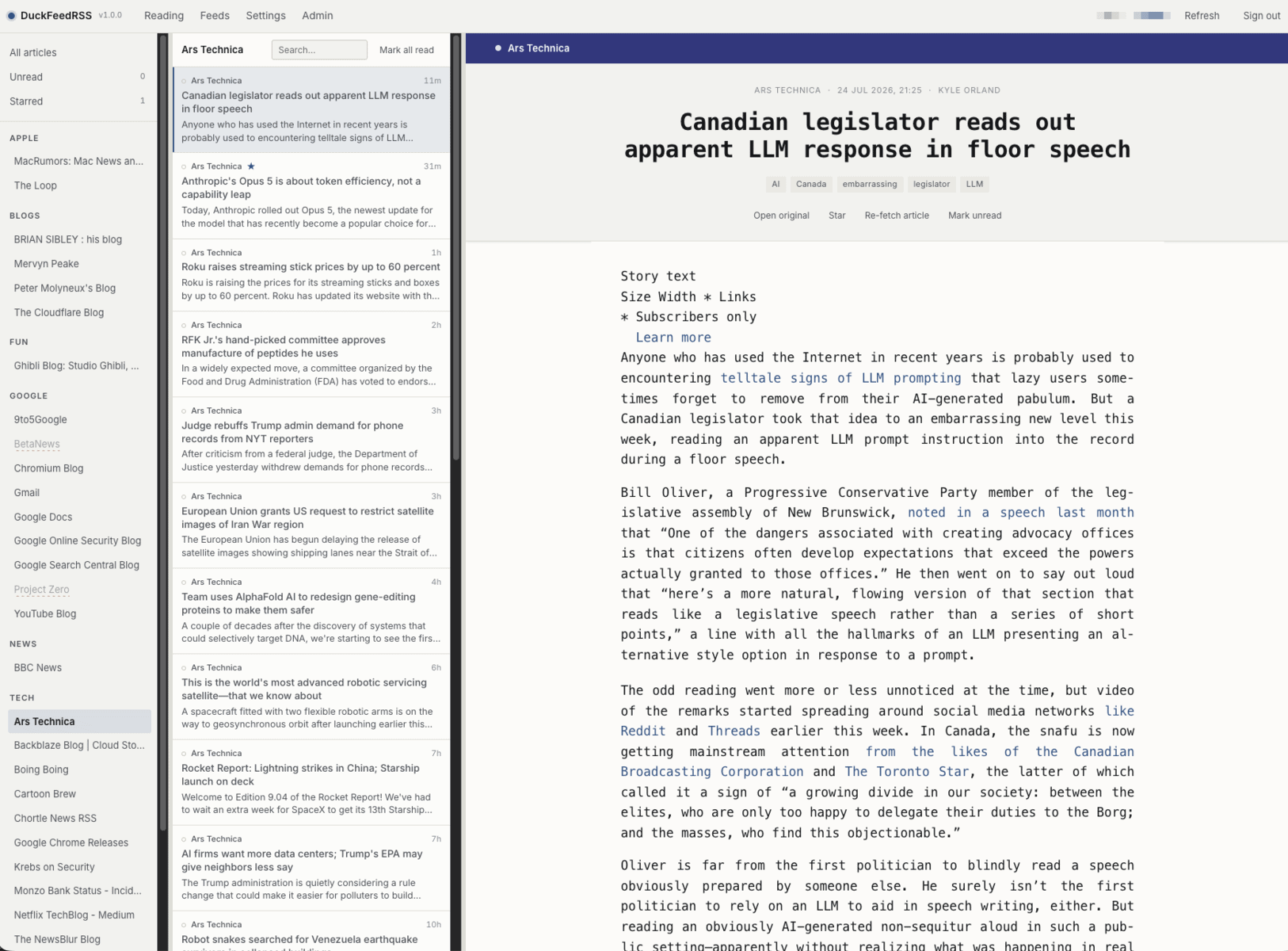
Therefore, I’d like to introduce DuckFeed RSS (formally known as ArseBucket – it’s undergoing a rebrand for obvious reasons, so the screenshot below may be out of date). It lets me import OPML feed files, and read them by category. It does exports too. In the settings menu, there is the ability to add categories and move the feeds between them. There is a right-click menu option for marking categories or individual feeds as read (as well as other options), and eventually I want to be able to move feeds between categories this way too without having to keep going to the menu.
The system refreshes the feeds every 15 minutes (through cron), and the user can manually refresh from the user interface. The UI itself can be customised – fonts, spacing, etc. and there were a few revisions improving the readability of articles (The Register’s feed essentially became one massive paragraph for a lot of their stuff). Read articles can be hidden or greyed out. Feeds can individually be set to retrieve extracts or full text (though there is a bit of a bug with backfill which is being looked at).
Additionally, the whole system ships as a zip file and an installer/upgrade shell script which handles everything from database and admin set-up through to SELinux context settings. The upgrade script ensures all new PHP files, etc. and updated database schemas are applied. It verifies everything as part of the process.
Future features including user invites (and possibly user registration), a name change (to something probably more sensible, though I cannot guarantee this – please put ideas in the comments below), sharing articles, more customisable user interface options, and so on.
In short: this is a fully fledged web-based RSS reader which replaces Feedbin and my trial of NewsBlur which wants $39/year for basic reading and doesn’t even let me add RSS feeds like this blog (no, for that requires a $99/year subscription).
Footnotes
Not really, I pay for Claude Pro at £15/month – but that brings with it a wealth of other benefits. ↩︎
Well, as I usually do (or rather, at least, did last year) – I installed the new public betas of the next release of iOS, macOS and watchOS on my main Apple devices. I was curious to try the new and improved Siri, along with an updated macOS which many on the developer betas claimed was much faster than the current (but soon-to-be-previous) release.
iOS 27 and macOS 27 (Golden Gate) installed just fine. No issues at all. But watchOS 27 was a mess. It took over two hours to download and install, and when it did install, it was stuck on the Apple logo for a considerable amount of time, and the watch was getting very hot on the charger. So I took it off, and tried to force-restart it. Whether that worked or not, I don’t know, but it did recover and confirmed it had updated to watchOS 27.
ALAS!
The watch didn’t tell the iPhone it had been updated, and it seemed to be permanently stuck on “Installing” and kept referring to watchOS 26.5. I tried a number of things: rebooting the phone. Rebooting the watch (which was slow). I was going to reset the watch completely and started the process – but that got stuck too. Got an email from Apple’s Find My service that the watch was now unavailable to track if lost. Gulp
But the iPhone was insistent that the watch was still in install mode. Then I read some notes which told me to turn off Bluetooth on the phone and then turn it back on. That did the trick. The iPhone immediately recognised the updated watch and everything was working. Sort of. I had to check the watch was still available in my iCloud account (it was – and findable via Find My) – so all good there. But there are issues that apparently appeared in developer beta 3 and have survived into this public beta, where watch complications are missing. So I don’t have a fully functional Apple Watch Ultra 3 right now. That’s beta testing for you! But I know Apple will get around to squishing these bugs, and half the fun is in finding them and reporting them…
… which I had to do with macOS Golden Gate. Eager to get the new Siri running, I signed up for the waiting list on iOS as soon as I could. Got the service enabled minutes after doing so. Initial tests seemed to be okay, so I tried the same on macOS 27.
ALAS!
Switching on Siri on the Mac requires you to say a few phrases. For me, the first phrase was simple, but a bit of a tongue-twister, and eventually Siri kept telling me to try again. It could not hear me. I checked my Yeti microphone input levels. Tried different microphones, including the Mac’s, and it was still unable to hear me. I can’t activate Siri on the Mac until I go through this process. Didn’t have to do that on iOS 27, and Siri wasn’t enabled previously.
It also took a while for the Siri app to work on macOS – it did bugger all until the optimising stage on the iPhone got to a point where Siri could work. Or at least, that’s how it felt. Maybe it was just the language model being downloaded in the background – I don’t know; there’s no status bar like there was with Apple Intelligence in previous versions of the operating systems.
When Siri did kick in properly, it was better in many ways, but considerably worse in others. For example, it knows where I live when I ask it. But when I asked where the nearest bus stop to get me into Woking was, it gave me Woking station itself. When I said it was wrong, it directed me to Guildford’s Friary station – six miles the other way from home.
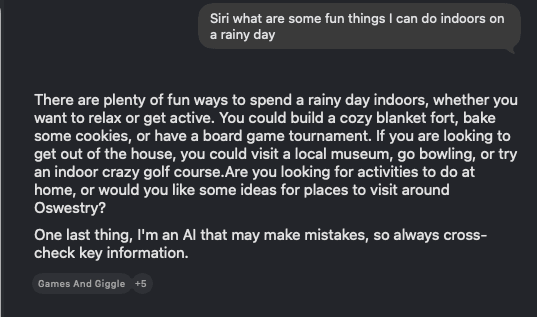
When I was trying and failing to set up Siri on the Mac, the iPhone’s Siri always, always kept interrupting, and its answer to one of the set-up questions (Siri, what are some fun things to do indoors on a rainy day?) was some fun things to do in Oswestry, Shropshire. Very random.
Chat transcript with the new “improved” Siri
I did have a crack at a few other new AI-related features, including reframing photos and extended photos. Similarly for Image Playground. They’re okay, but nothing to write home about. These are tools I can’t see myself using much – if at all. The Ministry of Misinformation hasn’t got much to be concerned about. But a definite improvement over the previous generation. Apple’s work with Google has certainly helped.
What I’d often like to do with A.I.
What I did find good, however, is that macOS Golden Gate is bloody fast. It feels much nippier than Tahoe in many ways – and especially Apple TV. Before, it would take forever to load, and then if I wanted to browse my movie or TV library, it’d take even longer to return the results. Here, it returns the results instantaneously and with full artwork (some of which went missing in Tahoe).
There are a few bugs here and there (launching Terminal from the Dock sometimes requires me to click twice for some reason), and I thoroughly dislike the Ask Siri option being at the top of the contextual menu when you right-click on something. All that does is bring up a black bar which does nothing, with no obvious way of closing it (you have to focus on it and issue the application close command – Cmd-Q).
The non-AI/non-Siri parts of iOS 27 are okay, too. No real issues there (as yet). All in all, it’s promising. But Siri still needs a bit of a kick up the arse – especially when it comes to British geography – and I also note that Siri cannot access my emails through Gmail (via the Gmail app), so either Apple or Google (or both) will need to work on that. The power that Siri could wield when it’s connected to supporting apps is promising. But I do not intend to use Apple Mail for my email, unfortunately.
Note: I am occasionally updating this post with new information as I think of additional interesting data points to provide, assuming I have the data!
Revision 1.9 – Added paragraph and table regarding human mailboxes vs no reply mailboxes along with the outcome of replying to them.
Revision 1.8 – Greenhouse.io emails DID mention the company in their no reply rejections. Had to kick Claude and myself up the arse on that one.
In September 2025 I was made redundant from Supermassive Games after two and a half years. I wrote about the leaving at the time; this is about the looking. In March 2026 I started as a Senior Systems & Applications Administrator at University of the Arts London. Between those two dates sits seven months of applications, and because I label my email obsessively and LinkedIn will give you your data if you ask, I can tell you exactly what those seven months looked like. So I audited the lot — every labelled Gmail thread, every sent-mail chase, the LinkedIn data export, and the tracking spreadsheet I gave up on — and this is what came out.
The headline numbers
At least 450 applications. I say “at least” because that’s only what left a trace: 317 tracked through email, 90 LinkedIn applications with no email footprint, a dozen-plus speculative emails to studios — and 36 that survive only in the tracking spreadsheet I started on day two and abandoned within a month, when the volume defeated the very idea of tracking. Anything deleted, or applied to through a portal that never wrote back, isn’t counted. The true number is higher and I’ve made peace with never knowing it.
Stage
Count
Rate
Applications (floor)
~450
100%
Explicit rejections
175+
~39%
Silence — no response of any kind
the rest
~52%
Interview invitations
33
~7%
Interviews actually held
27
~6%
Rejected after interviewing
17
—
Offers
1
~0.22%
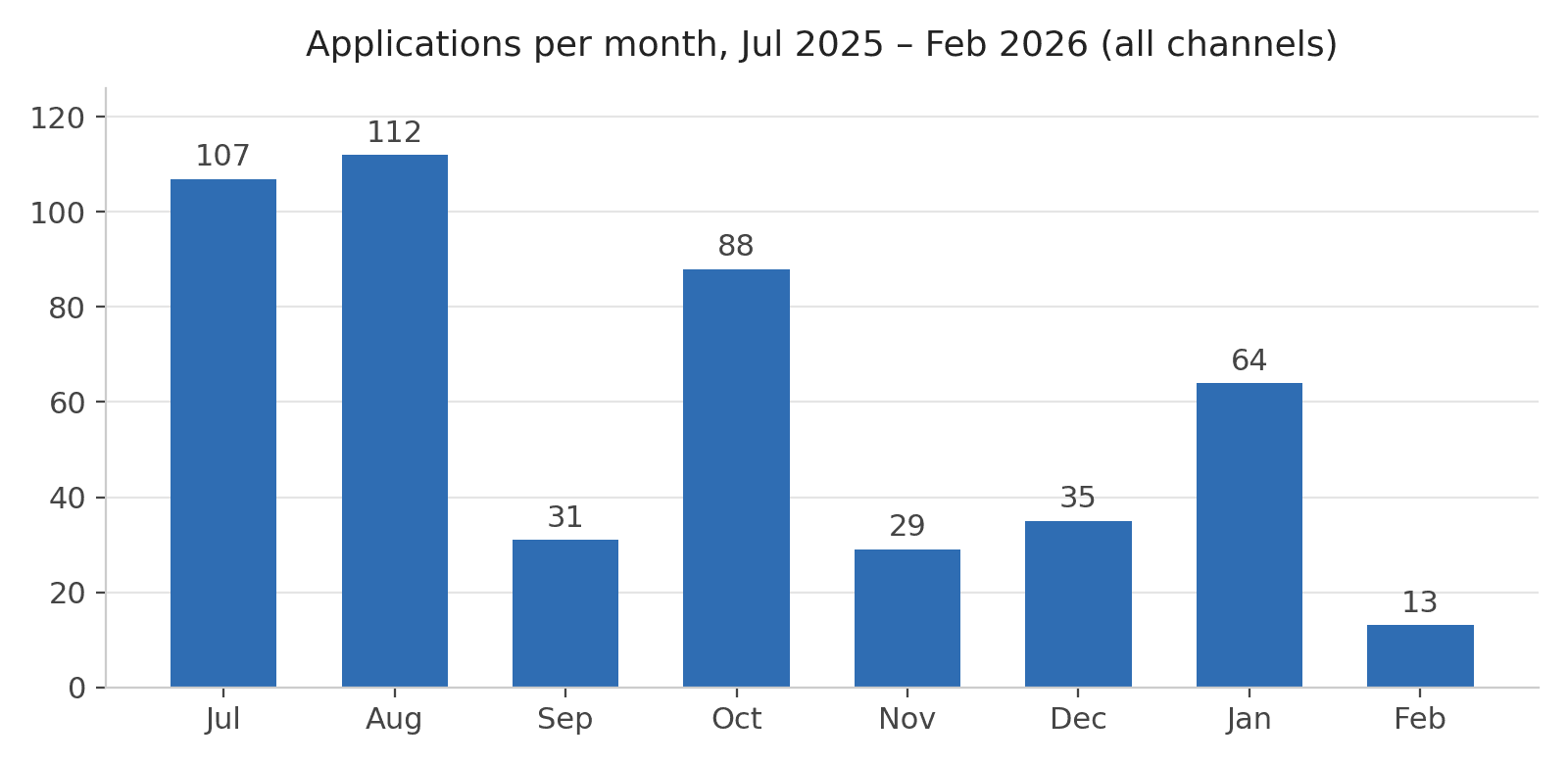
Seven months, 205 days from first application to offer, averaging fifteen applications a week — with one week in late July topping fifty. A meaningful chunk went out between 10pm and 3am, including, fittingly, the formal application for the job I actually got, submitted at four minutes past midnight. What can I say? I’m a night owl.
The shape of the thing
Four phases. A July–August blast of well over two hundred applications, launched while still working my notice. A September lull spent actually interviewing. An October re-surge that seeded the deepest processes of the whole search — two companies took me to three interview stages each, and both processes then died quietly in the December trough, where the entire market goes to hibernate. Then the January push: sixty-four applications, nine interview processes running concurrently, one of which finished the job.
The CV itself kept a version history, and it maps the same terrain. My filenames confess to at least thirty revisions across the seven months — seventeen deployed on LinkedIn alone. The original lasted one week. Six revisions happened in a ten-day sprint in early September; one version then held stable through the whole confident October push; and on the morning of the twin worst rejections of the search I revised it twice in a single day. New Year’s Eve produced two versions before midnight, the first week of January five more — and the thirtieth-odd revision, finished on 7 January, was the one in circulation when the application that ended everything went in two days later. Thirty drafts to learn the document was never the problem.
What was I applying for?
One more cut of the data, with a caveat: job titles only survive for about half the applications — the LinkedIn export, the tracker, and the interview processes — so this is a sample, not a census. But the sample has a clear shape, and it contains the most useful practical finding in this post.
Role type
Applications
Interviews
Conversion
Support / helpdesk / desktop
65
6
~9%
Other / specialist
38
3
~8%
Systems admin/engineer (generalist)
37
8
~22%
Infrastructure
24
6
~25%
Cloud / DevOps / Platform / SRE
22
5
~23%
Linux / Unix explicit
21
3
~14%
IT management
9
0
0%
Security
8
1
13%
Windows / Microsoft explicit
5
1
20%
Role types across the 229 applications where a job title survives. Conversion rates are indicative, not gospel — the table’s best rate is one interview from five applications.
And we can also break this down by the level of job I was applying for — a different cut of the same 229 titles, so the buckets overlap: an “IT Support Manager” counts as support in the table above and as management-titled in this one.
Title level
Applications
Share
Interviews
Conversion
Junior-marked (junior/associate)
6
3%
0
0%
Management-titled
16
7%
1
6%
Regular (unmarked mid-level)
175
76%
25
14%
Senior-marked (senior/lead)
32
14%
7
22%
The single biggest thing I applied for was a step down. Support, helpdesk and desktop roles were nearly a third of everything — a senior sysadmin applying for service-desk work, on the theory that surely those would be easy to get. They weren’t. They converted at half the rate of roles at my actual level, presumably because an overqualified applicant doesn’t read as a safe pair of hands; he reads as someone who’ll leave the moment something better appears. Meanwhile the roles that matched my level — generalist sysadmin, infrastructure, cloud — were about a third of my applications but produced two-thirds of my interviews. The market’s message was consistent: apply at your level. It just took me seven months and 450 data points to hear it.
Two smaller notes. Explicitly-Linux roles barely exist as a category — nine percent of what I applied to, converting poorly — because the market doesn’t advertise for Linux specialists; it advertises “systems administrator” and expects the Linux to come along inside, which at UAL it did. And the down-level applying wasn’t evenly spread: it spiked to about half of everything I sent in August and again in January, the two most stressed stretches of the search, and collapsed to a fifth during the confident October push. The instinct under pressure is to apply beneath yourself. The data says it converts worse, not better. If you’re in the tunnel and about to fire off a dozen helpdesk applications at 2am as insurance: I understand completely, and the numbers say send two at your level instead.
Seniority tells the same story with even cleaner numbers. The six explicitly junior roles I applied to — junior Linux, junior cloud, jobs I could have probably done in my sleep — produced zero interviews. Not few. Zero: two rejected me outright and the rest never replied, because nobody believes the overqualified applicant is staying. Management-titled roles converted at 6%, unmarked mid-level roles at 14%, and senior-titled roles — the smallest slice, and the one I actually belonged in — at 22%. The gradient runs perfectly in one direction: every step I aimed below my level cost me conversion, and the job I finally got was senior-titled. The market doesn’t hire insurance. It hires fit.
And there’s a financial twin to all of this. Where application forms demanded a salary expectation — a couple of dozen did — my answers form a time series. On day three of the search I was already asking for less than I was earning. By day six my floor had dropped to roughly a fifth below my salary, and there it stayed for seven months — sometimes “flexible due to redundancy,” twice literally “0” where the form insisted on a number. I was offering a twenty per cent discount and volunteering the reason on the form itself. It converted nothing, because it was the same instinct as the down-level applying, wearing a number: nobody hires insurance, at any price. The roles themselves made the point from both ends — one deskside job I sat two interview rounds for came with a salary more than half below what I’d been earning — I told them in writing that it was acceptable and that I could start immediately; they rejected me within the week anyway, while a fintech Linux role advertising up to £110,000 never replied at all. And the job that ended the search? A 14% pay cut against Supermassive — a real cut, honestly named, and one I can happily live with. Which completes the finding rather neatly: the panic discount converted nothing, and the employer that actually wanted me cost me less than the discount I’d spent seven months offering everyone else.
How fast do rejections arrive?
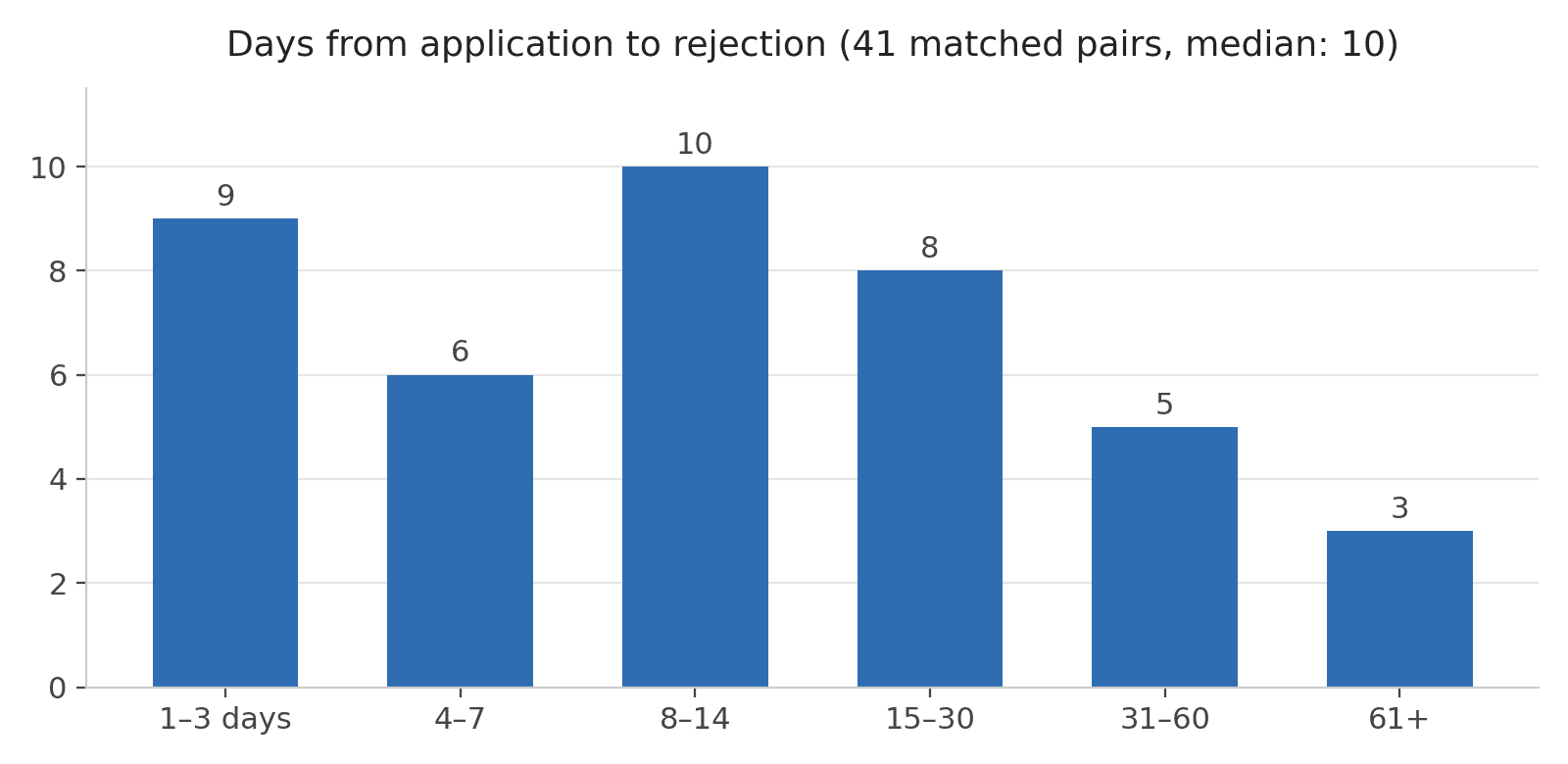
For 41 rejections I could pair with their applications, the median wait was ten days. A quarter arrived within three days. A quarter took longer than a month. The record at the fast end is held jointly by three companies who rejected me within 24 hours; the slow-end record among rejections that actually arrived is 78 days. The true record belongs to a company that never answered at all: a phone interview in early September, two chases, a “we’ll follow up” — and then nothing, forever. The only thing their agency ever sent me afterwards was a template rejection for a completely different vacancy, four months later.
The chasing experiment
Eight times during the search I chased a company for a decision after a silence. Here is the strangest finding in the whole dataset: every company I chased replied within a day — though one reply, it must be said, came from a machine, and second chases enjoyed no such record: they mostly disappeared into the same silence that prompted them. But responding and answering turned out to be different things. One chase eventually produced a rejection; three revived a genuinely live process; one was eventually told the role had been pulled (“business needs have changed”); two got a human holding reply followed by eternal silence; and one produced only an out-of-office autoresponder — 48 seconds after my chase, apologising for an absence that had ended the day before — and then nothing, ever again.
The morning-after rejection is the telling one. It arrived eleven hours after my chase, at 6:36 the next day. Decisions like that aren’t made overnight; they’re made weeks earlier and sit in a drawer until someone asks. And the company I chased twice after interviewing simply never answered — the same drawer, never opened at all. Which means some unknowable fraction of my two-hundred-odd “no response” applications aren’t unanswered at all. They’re answered. Nobody pressed send.
For balance: people moved fast enough when they had good news — the offer that ended all this was phoned through within a couple of hours of the final interview. But in seven months of waiting — the stretches where there was no news yet — exactly one recruiter ever wrote to me unprompted just to tell me where things stood. One. I remember it the way you remember good weather in February.
What actually worked
Channel
Volume
Interviews
Offers
Direct applications / company ATS portals
~250
~15
0
LinkedIn
113
4–5
0
Job boards
~65
2–3
0
Speculative emails to studios
14
0
0
Recruiters & agencies (actual humans)
~22 relationships
7
1
Read the bottom two rows against the top three. Four-hundred-odd self-service applications produced about twenty interviews and no offers. Twenty-two relationships with actual human beings produced seven interview processes and the job. The direct/ATS channel deserves special mention for its endgame: fifteen interview processes, fourteen of them ending in rejection, none in an offer. The machines can review and interview you all day. They just won’t hire you.
Which machines, specifically? Where an application confirmation survives in email, the ATS behind it is identifiable — about 120 applications’ worth — and the platforms did not perform equally.
ATS platform
Applications (email-confirmed)
Interview processes
Note
Greenhouse
~21
0
Rejections arrive from an anonymous no-reply sender, though the body names the company
Workday
~19
3
DXC ×2, Darktrace
Lever
~14
1
Numan
Workable
~14
2
Proxymity, Kurt Geiger
Ashby
~13
0
Teamtailor
~13
1
M+C Saatchi
SmartRecruiters
~7
2
Intelerad, NBCU — best big-platform rate
iCIMS / SuccessFactors / BambooHR
~12
1
JBi via BambooHR
UK public-sector one-offs (applybe/tal.net, JGP, Networx)
~5
3
Including the offer
The startup darlings were the worst: Greenhouse, Ashby and Lever collectively swallowed nearly fifty applications and returned a single interview. (In fairness to Greenhouse, its rejections are better-mannered than most — they name the company, blame the volume, and even append a curated list of job boards to try next. The manners are all in the template; none of them reached the outcome.) The unfashionable enterprise systems did better — Workday, everyone’s least favourite login screen, quietly produced three interview processes. And best of all were the dowdy public-sector platforms nobody has heard of, the ones with 2009 styling and confirmation emails that read like council-tax correspondence: a handful of applications, three interviews, and the one that became my job. In this dataset the rule held without exception: the shinier the ATS, the worse my odds.
The other clean signal was sector. I sent roughly ten applications to universities, public bodies and civic institutions; five turned into interview processes, and one turned into my job. That’s a 50% interview rate against roughly 6% overall. Whatever my CV says, the public sector could read it and the private sector, by and large, could not.
And LinkedIn deserves its own paragraph, because the export was a revelation: 90 of my 113 LinkedIn applications left no other trace anywhere — and 57 of those went to postings by recruitment agencies, which turn out to be the deepest black hole in the entire job market. If you’ve ever Easy-Applied to an agency ad and wondered why you never hear anything: it isn’t you.
The agency lottery
Recruitment agencies deserve their own accounting, because they were somehow both the worst channel and the only one that worked. I sent roughly seventy-five cold applications to agency-posted ads across LinkedIn and the job boards; about one in eight ever produced a reply from a human being. But once a human did engage, roughly one relationship in three turned into an interview process — ten times the cold rate — and the only offer of the entire search arrived through one. Agencies aren’t a good channel or a bad one; they’re a lottery ticket stapled to a fast-track pass. And since this post’s appendix names names, so will this section. Three tiers, ranked by what each agency actually delivered.
Tier 1 — produced a live process
Where it led
How it ended
Hays
UAL — three stages
Offer in 27 days, phoned within a couple of hours of the final interview. The channel’s entire justification.
Think IT
Homeprotect — three stages, final presentation
Genuine phone-first advocacy throughout; the outcome arrived by telephone and is lost to history.
Ashdown Group
T-Scan — phone interview within a fortnight
Then two chases, one holding reply, and permanent silence — the January rejection turned out to be for a different Ashdown vacancy entirely. Fast in, never out.
Ocho People
Payroc — interview booked
Process collapsed mid-October.
LinuxRecruit
Vorboss
Role pulled — “business needs have changed.” Not their fault; conduct was fine.
hackajob
BAE — screening call
I withdrew when the role wasn’t as described; the platform never followed up either.
Responsiv’s agency
First stage inside a week
I withdrew over the commute.
Tier 2 — human contact, no process
What happened
Client Server
Actually phoned about a hedge-fund sysadmin role a month after my application — then nothing further. The closest thing to a middle tier in the whole dataset.
Primis
My notes from the time: “confusing, delayed responses.” Time comprehensively wasted.
Brxio
At least sent a rejection — which, in this tier, counts as distinction.
Intelstack; Delta Class Tech
One recruiter email each, then nothing.
jackandjill.ai
Six messages of robotic courtship from an AI recruitment agent. Zero roles. The future, cold-calling.
Tier 3 is everyone else, and it is vast: around thirty-five agencies and nearly fifty applications that produced total, permanent silence. Switch Tech Talent (five applications — more than I sent any actual employer in seven months), Miller Maxwell and Franklin Fitch (three each), Hamilton Barnes, Stanford Black, Premier Group, Klyk and Fortray (two each), and a long single-application roll call: 4Square, Refreshing, Hunter Bond, Harnham, Signify, Oliver Bernard, Harmonic, Talent Locker, Levy Global, Pioneer Search, Fruition, Vertus, Lorien, Venn Group, Understanding Recruitment, Sphere Digital, La Fosse, Harrington Starr, Xcede, Morson Edge, Digital Waffle, Mayflower, Piccadilly One, Humand Talent, Langley James, Tempest Vane, and friends. Not one reply among them. The organisation I applied to most in my entire job search was a recruitment agency with no job of its own, and it never once acknowledged I existed.
The tier structure is itself the finding: agency performance wasn’t a spectrum but a binary. Every Tier 1 process began within about two weeks of first human contact; there is no slow-but-eventual tier. So the practical rule, if you’re in the tunnel: an agency that hasn’t responded within a fortnight isn’t going to, and applying to it again — I did, repeatedly — is four applications the data would never have justified.
Reasons to be miserable, 1..2..3..
A summary of rejections by reason.
Template organ
Measured prevalence
Reading
“High volume / many qualified applicants” excuse
30 rejections — ~1 in 5
The workload defence
The alignment costume (“skills/experience better align/match”)
21 rejections — ~1 in 8
A reason-shaped non-reason
“Careful consideration” family
Pervasive — Gmail’s counter breaks on it
The universal opener
The word “overqualified”
0
The operative reason, never stated
Specific, actionable feedback
~5 — ~3%
All from humans who knew my name.
Having counted the rejections, it’s worth asking what was in them. The answer, overwhelmingly: nothing, elaborately phrased. Nearly every written rejection was assembled from the same template organs, chained in sequence — thank you for your interest, careful consideration was given, and best of luck out there. About one in five blamed volume: “a high number of applications,” the workload defence, sometimes deployed within seventy-two hours of the application it claimed to be buried under. About one in eight wore what I came to think of as the alignment costume — “candidates whose skills more closely align with the role” — a sentence engineered to be undisputable because it names neither the candidates nor the skills. Two rejections managed to be actively wrong: one auto-closed my application for a location mismatch that didn’t exist, and one turned me down for a role that, on inspection, wasn’t open. And across roughly one hundred and fifty CV-stage rejections, the number containing a specific, actionable reason was zero.
Genuine feedback existed — about five times in seven months, a hit rate of three percent — and every single instance came from somewhere a human knew my name: the panel that interviewed me, the company that rejected me twice but corresponded like people both times, the recruiter who’d already invested in me, and my former employer. Feedback, it turns out, isn’t something processes produce. It’s something relationships produce.
But the most telling reason is the one that appears nowhere. The tables near the top of this post prove that overqualification governed my outcomes — junior roles rejected me at a rate of one hundred percent while senior roles interviewed me at the best rate in the search. Not one rejection ever said the word: I searched, and it appears in none of them. The reasons companies give and the reasons companies have are two entirely separate datasets, and only one of them was ever going to reach my inbox.
And who — or what — sends them? Over half of my written rejections arrived from addresses that declare their own deafness: no-reply, do-not-reply, do_not_reply. Another thirty-one — I counted — came from machinery in disguise: company-named aliases at myworkday.com, “system@successfactors”, per-message token addresses, and in one case the ATS vendor’s own helpdesk, as if the rejection had been sent by the software’s customer support. DXC managed a category all of their own: a reply address that was simply wrong — my response bounced outright, and reaching a human meant going back to a previous contact at DXC to get the recruiter’s real address, then trying again, with a cheery ‘hopefully this reply will work this time. It did; the address they’d given me never would have. Only about a quarter of rejections came from a mailbox with a detectable human behind it. I know, because I tested them: I replied to at least eighteen of my rejections, routing around the robot envelope wherever a real name appeared. Six ever got an answer — and one of those answers reversed the rejection. End to end, the arithmetic of the system: most rejections arrive from something that cannot hear you, some from an address that pretends it can, and most of the rest from someone who won’t. But not quite all — which is why I kept replying.
Sender classification across ~160 written rejections. The 31 is an exact count; the rest carry tildes for the usual reasons.
Machinery in disguise (myworkday.com aliases, system@successfactors, iCIMS token addresses, the ATS vendor’s helpdesk)
31
~a fifth
No, but they don’t say so
An address that was simply wrong (reply bounced outright)
1
—
Only by fishing the human’s real address from another contact
A mailbox with a detectable human behind it
~30–40
~a quarter
Yes — in theory
The reply experiment
Count
Rejections I replied to
18+
Replies that ever received a human answer
6
Answers that reversed the rejection
1
Ford Prefect?
In the fortnight after the redundancy was announced, I emailed thirteen studios directly — the Guildford games cluster, plus a handful of VFX and post houses further afield — no ATS, no form, just a CV and an honest paragraph about what was happening at Supermassive. Thirteen emails. Five got a response. Three of those were warm, personal, and human: one studio’s reply came from someone who had once worked at Supermassive themselves; another forwarded my CV straight to their Head of Technology. Zero produced a job, because a town where every studio knows exactly why you’re available is also a town where nobody has headroom to absorb you. But those three replies were the most humane correspondence of the entire seven months, and I’d send all thirteen emails again.
The first of those thirteen — the first email of this entire dataset, in fact — was really a return visit: that studio had interviewed me for their Head of IT role in early 2024, during an earlier round of layoffs, back when I still had a job to be nervous about. This time, the same address produced an auto-reply and nothing more.
The white whales
One thread runs underneath this whole dataset and predates it by years: I have been trying to get back into visual effects for the best part of a decade. I spent six years inside that industry, at MPC and Imagineer, before the path led elsewhere — and ever since, I’ve kept testing the door. My mailbox has been quietly archiving the attempts, and they tell their own story: the path back was rocky even when I was safely employed. Unemployed, it turned out to be bleaker still.
The employed years first. Framestore: a Senior Linux OS Engineer application in 2018, a Senior Systems Engineer application in 2019, and in 2022 an actual video interview — followed by three weeks of silence, two chases, and finally an email from me closing my own application, because I’d accepted a job elsewhere and nobody at Framestore had ever answered. Territory Studio interviewed me in November 2021 and turned me down in the nicest way in my entire archive — a personal note and a genuine “hopefully next year”; in 2022 they reached out to me about a role days after I’d applied for it, and that came to nothing too. And Industrial Light & Magic, the whitest whale of all: a Senior System Administrator application in 2018 that got me a recruiter phone call and then two weeks of silence I had to chase; another round of contact in 2022; a Senior Systems Engineer application in April 2024 that I withdrew and resubmitted because Workday’s CV parser had silently discarded my work history (I told them exactly why, naturally); and that September, a Systems Administrator I role — a junior grade, two levels below the job I actually held — which earned an auto-reply about “a very high volume of applications,” a second contact address that bounced, and an out-of-office from the recruiter I’d corresponded with since 2018, mentioning that his last day with ILM would be 31st December. All of that — the ghosted interview, the chases, the broken infrastructure I debugged for them, the creeping downgrade in what I let myself apply for — happened while I had a job. That’s what the path back looked like from safety.
Then the redundancy came, and I tried the same doors without a net. Framestore, August 2025: a Data Services Technician application — a technician role, from a senior administrator — met with silence. Territory, Christmas Eve 2025: a Junior Systems Administrator application, template-rejected in the new year on the grounds that other candidates were better aligned; my reply took six minutes and began, “In other words, younger and cheaper.” And ILM: every application from 2024 onward went through Disney’s Workday and was rejected outright, without explanation — and Workday never sent a single status email, so the rejections simply appeared in the portal, silently, waiting for me to remember to log in. This post’s dataset contains no ILM applications at all: not because I stopped applying, but because the system stopped leaving evidence.
Put the arcs side by side and this post’s central finding was visible years before I could see it: Senior Linux OS Engineer became Data Services Technician; an interview became a junior application; Senior System Administrator became Systems Administrator I. The industry I most wanted back into is the one where I applied furthest beneath myself, for longest — and it answered the way the data says everyone does, only quieter. Rocky in employment. Bleaker out of it. And somewhere along the way I realised I just don’t want to be part of it anymore. VFX is a stressful game at the best of times; trying to find your way back in — with actual, demonstrable experience — turned out to be more stressful than the work ever was. ILM is still the best in the business, and it still has a lot to learn about how it treats the people trying to join it. I still watch the credits. I’ve just stopped checking the portal.
Mondo Bizarro
A search this size accumulates curiosities. I applied to a Formula 1 team (three times), a cruise line, two luxury hotels, a fashion house, a sushi chain, a football club, a learned society, a firm that prints banknotes, and the London Library — which, to its enormous credit, interviewed me. The Civil Service rejected three of my applications in a single eight-minute volley one October afternoon. One company’s “London” role turned out, five days into the correspondence, to be in Lisbon. I was courted for a fortnight by an AI recruitment agent, which felt like being cold-called by the future. I diagnosed email deliverability faults — broken SPF records, bouncing reply-to addresses, misaligned DKIM — for at least six companies while applying to them, free of charge, out of sheer professional reflex. And the rejections outlived the search itself: five more arrived after I’d accepted my new job — the first barely twelve hours after I signed, a record label’s seven weeks after I’d started work, and the last a full three months into the new job, thanking me for my interest in “the position of 223178.” Not a job title: a requisition number. By that point they read less like bad news and more like postcards from a country I’d already left.
Credit where due — and the other list
I’ve kept the body of this post largely anonymous because the point is the system rather than any one employer. But an audit deserves an appendix. So: names, for the record, in both directions.
The Good
Who
What they did
Hays
Phoned rather than emailed at every step — pre-screen, prep call, an unprompted check-in before the second interview, the offer itself within a couple of hours of the final interview, then a fortnight of onboarding shepherding. The only offer.
Epic Games
The only unprompted mid-wait status update of the entire search: their recruiter wrote, with nothing yet to report, purely to say when there would be news.
Octopus Energy
Rejected me twice — both times with genuine written feedback from a human who kept replying. The gold standard for saying no.
BBC
A proper panel interview, and a rejection inside a fortnight with feedback substantive enough to engage with.
Fireproof Studios
Answered a speculative email by the next morning, warmly, from someone who had once worked at Supermassive themselves.
Fuse Games
Forwarded a cold CV to their Head of Technology unprompted.
Glowmade
Replied to a cold approach like human beings and kept the CV on file with a personal note.
The AA
Rebooked same-day when I was ill, with a get-well message, and answered my chase by booking a second interview.
CGI
Fast CV feedback, an apology when chased, and a genuine three-stage process.
Exclaimer
Engaged with my complaint about a mislocated job ad, passed it on internally, and kept corresponding after rejecting me.
London Library
Gave a wildly off-profile application a real interview, with humane correspondence either side. I thoroughly disagreed with a lot of their feedback, but at least they were responsive and clearly honest in their answers.
The Bad AND the Ugly
Who
What happened
M+C Saatchi
Screened me, went silent for seventeen days, then rejected me at 06:36 — eleven hours after my chase. Twice in nine weeks, identical boilerplate.
Techex
Promised “an update early next week”. Never sent it. My chase produced a 48-second out-of-office autoresponder, then eternal silence.
Ashdown Group / T-Scan
A phone interview, two chases, a “we’ll follow up” — then silence, forever. The only email their agency ever sent afterwards was a template rejection for a different vacancy, four months on.
Aristocrat
Auto-closed my application with a “location may not align” reason I promptly disproved; my challenge earned a formal rejection three days later.
Cloudflare
Advertised a London role that turned out, five days into correspondence, to be in Lisbon.
Chi Square Labs
Invited me to the next stage, then vanished. That invitation is the only email they ever sent.
Perforce
Lost my replies, insisted they had never arrived (my mail logs showed delivery), scheduled an interview, then let it die over Christmas unrebooked. They withdrew the job.
The LinkedIn agency collective
Fifty-seven applications into recruitment-agency postings; near-total, industrial-scale silence.
Honourable mentions in between: Gravity Media answered like humans when I reported a bug in their application form — the sixth company whose website I debugged mid-application — then, once I’d actually applied, produced one “still shortlisting” when chased and ignored the second chase entirely; Woking Borough Council wrongly screened me out, then admitted the mistake and invited me in; De La Rue pulled the same reversal a stage later — an initial rejection after my first interview, which I challenged, since the interview itself had strongly hinted at a second round, and which duly turned into an invitation to one; DXC ran a two-round process from behind a reply-to address that bounced (along with other issues that were unresolved); and the Civil Service’s three rejections in eight minutes were brutal but mercifully decisive.
And the one I’ve been leaving out: in November, four months in, I applied for a Security Engineer role at Supermassive Games — the company that had made me redundant that September. They turned me down, with reasons, and from people who knew my work personally. By this post’s own standards it was one of the better-handled rejections in the whole dataset. It was also, by a distance, the one that hurt most — because at month four, a no from the people who know you best doesn’t read like a hiring decision anymore. I wrote back angrily — the kind of reply you send in month four and wouldn’t have sent in month one. I mention it because it’s the truest measurement of stress anywhere in this post.
The stress of a long search doesn’t appear in any of the tables above, but it was underneath every row of them. If you’re in that stretch now: these numbers describe a system, not you. There were weeks when I needed someone to tell me that, so consider it told.
How it ended
I applied for my current job in early January 2026 through an advertisement by Hays recruitment agency. Hays called a week later, and from that call to the offer took 27 days — a prep call, a first interview, a second interview in person, and then an offer phoned through within a couple of hours of me walking out of the final interview, with written confirmation following the same afternoon. After seven months of ten-day medians, 124-day silences and morning-after rejections, the process that actually wanted me moved at the speed of a decision that had genuinely been made. That, in the end, is the tell I’d offer anyone still in the tunnel: the right one doesn’t leave you guessing.
I started at UAL on 9 March. The spreadsheet is closed. Mostly.
Methodology & caveats:figures were compiled from labelled Gmail threads, sent-mail searches, a LinkedIn data export, and the tracking spreadsheet I kept for the first month, with the analysis assisted by Claude working through the mailbox.
All counts are floors: deleted emails are invisible (at least one rejection provably existed and no longer does), some outcomes arrived by phone and were never written down, and LinkedIn doesn't export outcomes at all — and some ATSes, Workday chief among them, often never email status changes either, posting rejections silently in-portal for the candidate to discover on login, so an unknown slice of the "silence" column is really rejection-by-noticeboard. (The complete LinkedIn message archive was also checked: it contains no rejections either. The silence was silence.)
Nearly every correction made during the audit moved an "unknown" into the rejection column; only a handful went the other way. Draw your own conclusions about the ones still marked unknown.
Discs? DISCS? Where we’re going, we don’t need no discs
Sony has had quite the fortnight. First it announced that 551 Studio Canal films and TV shows will be removed from PlayStation video libraries — including from the libraries of people who paid for them — on 1 September 2026. Then, on 1 July, it announced that from January 2028 it will stop producing physical discs entirely for new PlayStation games. It’s probably about time we reviewed our consumer laws protecting users against the deletion of games, books and movies — any digital media — from our respective online accounts by the digital store owners, the distributors, or even the copyright owners.
A couple of points worth being precise about, because they make the situation worse, not better. Sony actually stopped selling and renting films on the PlayStation Store back in 2021 — so these aren’t titles being withdrawn from sale; they’re being clawed back out of libraries people already bought into. The removal affects the UK and Europe (US users apparently get to keep theirs), covers the likes of Terminator 2: Judgment Day, Total Recall, Apocalypse Now: The Final Cut, Hot Fuzz, Paddington 2 and Pan’s Labyrinth, and comes with precisely zero refunds or compensation. Sony’s notice blames “content licensing agreements” and leaves it at that. And this isn’t even the first time: Sony pulled the same Studio Canal trick in Germany and Austria in 2022, and in December 2023 announced the removal of purchased Discovery TV content (later walked back after a monumental backlash).
The “You will own nothing and like it” era
In this modern age of digital content, consumed immediately on demand across different platforms, we’ve reached the point where convenience outweighs ownership and the (in)ability to keep a non-tangible product even if it’s no longer being sold. Violate the terms and conditions of your Amazon, Sony, Microsoft or Google account? Anything you’ve “bought” will be wiped forever. Distributor or publisher goes bust? Your movie or book vanishes from your online library. Licensing terms change and titles get pulled? Same result. The PlayStation End User Agreement — like most digital storefronts’ terms — says outright that you’re buying a licence to view content, revocable when the underlying licensing deal expires. The word “purchase” on the button is doing an enormous amount of dishonest work.
This happened to me with the film Attila Marcel by Sylvain Chomet, an excellent French film from the director of The Triplets of Belleville and The Illusionist. I had bought a copy on Apple TV and it vanished without warning a year or two after purchase. I approached Apple for a refund; they refused. Apparently the distributor went bust. If the movie had been downloaded to my Mac, I’d have been able to keep watching — but when you have over 500 movies in your collection, storing all of them locally is a bit of a pain in the arse. Apple doesn’t exactly go out of its way to let you archive your digital content, especially movies: anything with “iTunes Extras” can’t be downloaded at all. It’s all streamed.
Ironically, Attila Marcel was still available to buy on Amazon Prime for about four months after Apple removed their copy. I went and bought the DVD instead. If I were a more sensible person, I’d buy a Blu-ray drive for the Mac and rip my collection into a format I can play on any of my devices. But that remains technically illegal under UK copyright law: the private-copying exception introduced in 2014 was quashed by the High Court in 2015, so format-shifting your own legally purchased discs is once again unlawful. Woefully behind the times.
By making all content digital, we’re heading for a world where shops like CeX — anywhere you can buy second-hand DVDs, Blu-rays and games — eventually disappear as everything transitions to strict rights control. You won’t be able to share, sell or give away your copy of a film, game or book unless the digital rights management system deigns to let you. And piracy, I’m sure, will only increase as a result. Judging by the reaction to the Studio Canal news online, plenty of people have already reached the same conclusion.
Better digital rights for consumers
I want to see the law — especially UK law — enshrine consumer protections into digital purchases so that none of the digital store owners, their partners or third-party sellers can remove content that has been “purchased”.
If your account is closed for whatever reason, any purchased content must be transferred to a similar service elsewhere — and a statutory right to port purchased digital goods between services should be available to all consumers.
If a distributor removes content from a store (again, for whatever reason), it must remain available to download from that store — or another — without charge to the consumer. If that’s not possible, reasonable compensation must be paid. “Due to our content licensing agreements” should not be a magic incantation that makes your money disappear.
Obviously there need to be reasonable provisions for the stores and rights owners in all this. Video game platforms come and go: we’re on the PS5 (and PS5 Pro) now, and analysts reckon Sony’s January 2028 disc cut-off all but confirms the PS6 won’t arrive before 2028. How long Sony and developers will support previous generations has to be considered. On the other hand, there are still developers out there writing new 8-bit games for the Commodore 64 and ZX Spectrum, so “the platform is old” isn’t much of an excuse either.
The empire strikes back
What I fear for the future is that the terminology quietly changes to protect the tech companies and rights owners — “purchase” and “buy” rebranded as “long-term rental” or “indefinite licence”, which means exactly what it means now: content can be removed for whatever reason, with no compensation. And I suspect they’d backdate it, so anything you’ve already bought remains liable for removal regardless of any new laws introduced. Sony has, in a sense, already done the rebranding retroactively — the EULA said “licence” all along; it’s just the shop front that said “buy”.
Monopoly money
Which brings me to pricing, because digital-only doesn’t just mean you can lose the game — it means you can’t shop around for it in the first place. If a game exists only as a download on PlayStation, there is exactly one shop in the entire world that sells it: the PlayStation Store. Sony sets the price, and Sony’s contracts require publishers to sell exclusively through its store and hand over a 30% commission on every sale. Compare that with discs, where Amazon, the supermarkets and the specialist shops all compete and undercut each other. Sony understood this perfectly well, which is presumably why in 2019 it banned third-party retailers from selling full-game digital download codes — eliminating the last channel through which any competitive price pressure could reach a PlayStation digital purchase. (A US class action over precisely that move was settled for $7.85 million, with no admission of wrongdoing, naturally.)
And this isn’t just me grumbling: it’s currently before the courts. The Alex Neill v Sony claim at the UK’s Competition Appeal Tribunal — brought on behalf of around 11 million UK consumers over purchases made between August 2016 and February 2026 — alleges that Sony abused its dominant position by blocking all competition on the PlayStation Store, allowing it to overcharge for digital games and add-ons by around 20%. The claimants’ benchmark is telling: physical copies of the same games, sold in a competitive retail market, averaged about 20% cheaper than their digital equivalents. Estimated damages come to roughly £182 per class member — about £2 billion all in. The ten-week trial (the longest of its kind) concluded in May 2026 and the Tribunal is now deliberating. Sony’s defence is that it competes with Xbox and Nintendo at the console level, and that its commission subsidises cheap hardware; the claimants’ rather compelling response is that nobody standing in Argos can calculate a console’s lifetime digital game costs before buying it.
Nor is the UK alone: a parallel Dutch case on behalf of 1.7 million gamers reckons the digital premium there runs to 47% over physical, with further actions under way in Portugal and Australia. And there’s precedent for this sort of thing going badly for the platform holder: the Tribunal ruled against Apple over its 30% App Store commission, to the tune of £1.5 billion.
All this sits alongside Rockstar confirming that the “physical” edition of Grand Theft Auto VIcontains no disc at all — the box holds only a download code, at full price ($79.99 standard, $99.99 Ultimate). Boxed copies go on sale on 12 November so buyers can pre-load ahead of the 19 November launch. Take-Two’s CEO denied “no physical version” reports back in February, and technically he wasn’t lying: there is a box. There’s just a piece of paper in it. Reports differ on whether a proper disc edition ever follows — Rockstar support has vaguely promised a “physical copy” in “the following months”, while a source told The Hollywood Reporter that no discs are planned at launch or after. A couple of specialist retailers have refused to stock it on principle.
To be fair, digital distribution has genuine benefits. There’s not much need to pre-order beyond letting your internet connection breathe while the content downloads ahead of launch day, rather than fighting a clogged-up ISP whose traffic on 19 November will consist mainly of GTA VI downloads. Developers can patch installed games readily. You’re not limited by physical media sizes — and indeed Rockstar has cited the sheer size of GTA VI as one justification for skipping the disc. Sony and its associates haven’t pushed optical disc capacities since UHD Blu-ray, as ecosystem after ecosystem goes fully digital. Leak prevention is the other obvious motive: no discs in warehouses means no street-date breaks. None of which explains why the code-in-a-box costs the same as the download.
Is physical media use actually increasing?
Here I have to be more careful than some of the headlines. A widely shared TechRadar piece quoted a manufacturing agency, Key Production Group, reporting a 10,000% increase in their own Blu-ray orders — over the past eight to ten years, and particularly in Blu-ray Audio. That’s one company’s order book, not the market. The broader picture from the ERA’s December 2025 figures is that physical video overall is still declining, but Blu-ray itself grew by around 3% — a genuine reversal after years of grim numbers, driven substantially by 4K/UHD steelbooks and special editions, which accounted for roughly £2 of every £10 spent on 4K Blu-ray in 2025. Vinyl, of course, continues its long resurgence. And nobody has told the Criterion Collection that Blu-ray is dead: they continue to release beautifully restored films on disc with all manner of cool features.
So no, physical media isn’t booming across the board — but the premium, collector-driven end of it is demonstrably alive, and every “purchased content will be removed from your library” email Sony sends out is free advertising for it.
In any event, I still say we need better consumer protection laws for digital media, because I will not allow the likes of Sony and their chums to take away content I paid for because licensing agreements or rights have expired. That’s not a me problem, that’s a YOU problem, Sony. And you will damn well fix it if you want to keep my custom — though I’m reminded of Mr. Prosser in The Hitchhiker’s Guide to the Galaxy, asking Arthur Dent how much damage the bulldozer would suffer if he just let it roll straight over him: “None at all.”
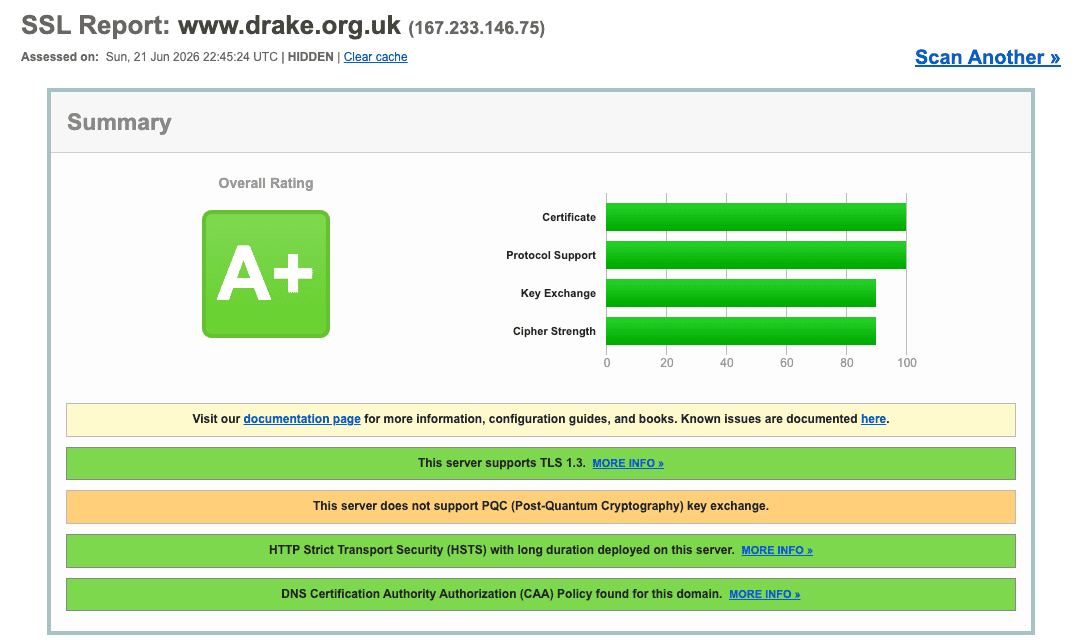
Next goal is to obtain the PQC key exchange, but this is sadly not entirely possible with the Linux distribution I’m using due to various important supporting libraries.
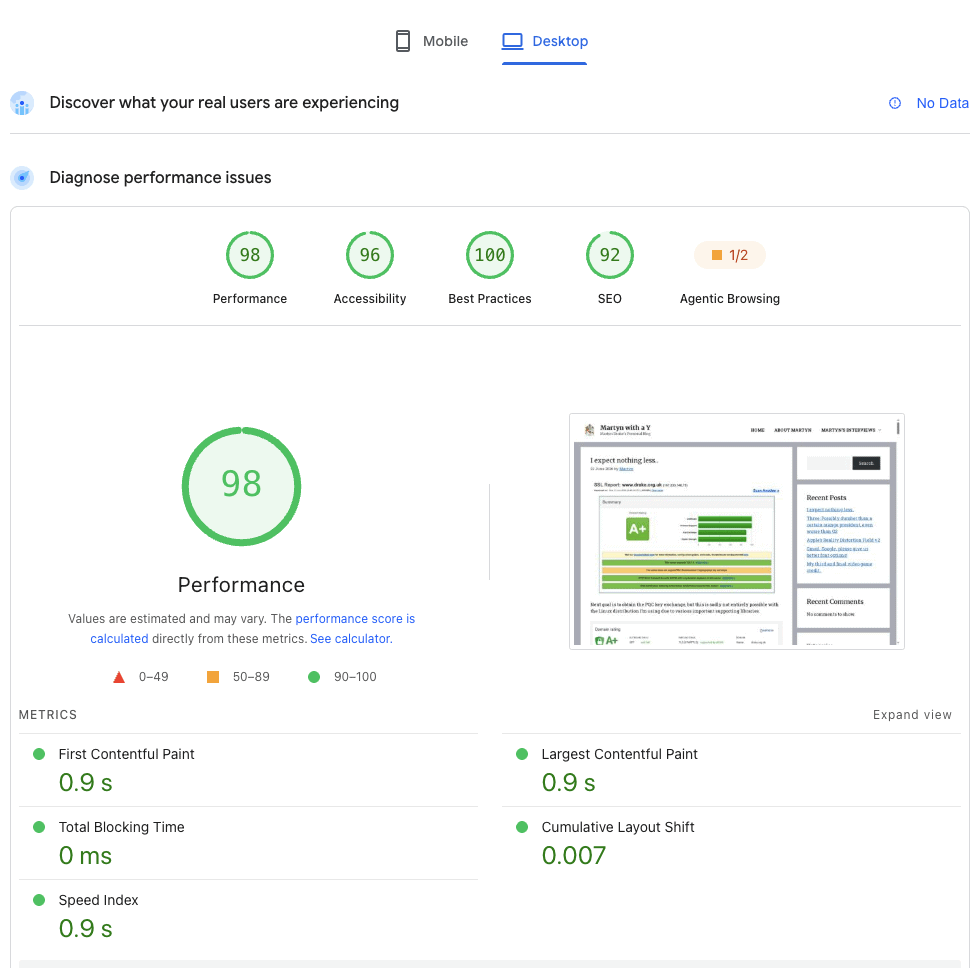
Also pleased with this with regards to performance. Again, could do with tweaking a tiny bit, but I’m overall happy with this. For now.
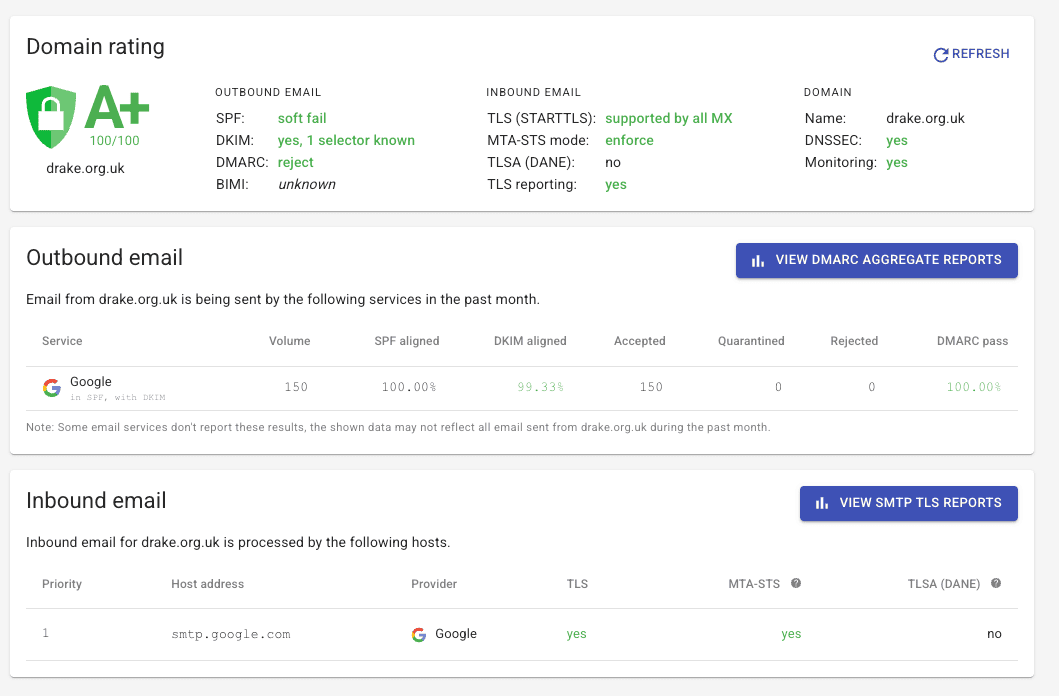
And likewise for the mail side of things, I can’t achieve any higher because BIMI is very much a business function that requires access to a registered trademark with an image/logo. It also costs over £1,000+ per year for the certificate that’s needed to prove the organisation’s identity. Google Workspace does not support TLS (DANE), so I can’t use that, either.
But my edition of Google Workspace does support S/MIME for encrypted email and sender/ID verification – so if you get an email from me using Gmail, you’ll likely see that the sender has been verified. If you use Outlook, not so much, because Microsoft makes it a pain in the arse to deploy and use S/MIME.
During the time that I was off work and beginning to run out of money, I had looked at the possibility of setting up a cheap 30-day rolling Three pay-monthly SIM account so that if things went sideways with EE and they blocked my main number, I still had a phone number that I could use to make and receive calls. The downside was that I’d have to give out my new number on all future job applications as well as relatives and friends.
I decided to do this. And added an Apple Watch data plan too (in case I was far away from the phone that I wasn’t able to take a call). Three months later (ironically), I had my offer with UAL and I didn’t need to do anything with my EE account, so I began cancelling the Three line. In some ways, having used another number for a few months has probably saved me from many random phone calls from recruiters asking me if I am still looking.
But, ALAS!
Firstly, cancelling (or porting) a Three number – especially the the main number – will cause you to immediately lose access to the web site and phone app. It requires the phone number for both the logging in and two factor authentication (which I still say is a major security risk – let us passkeys or third-party OTP authenticators). If the phone line is cancelled, you can’t log in at all.
While the main line was cancelled (along with it the direct debit), I couldn’t cancel the Apple Watch data plan because it wasn’t eligible at the time for cancellation. Yet, I couldn’t access my account online to see any of the details. In order to cancel and pay the remaining bills, I had to call Three which is the worst experience of any of the phone operators out there. It has a typical horror maze of options which aren’t helpful at all, you usually have to keep stabbing a number key or hash before it’ll even put you through to a human. Sometimes that doesn’t work and you just have to keep waiting until the menu system times out. Takes an absolute age. It took two months to cancel down (you need to give 30 days notice within 30 days – you can’t do it ahead of time) and pay off Apple Watch data bills. Apparently there is still a final bill to pay, so I’ll await the notification. I raised a complaint with them when I last spoke to them earlier this month about all this.
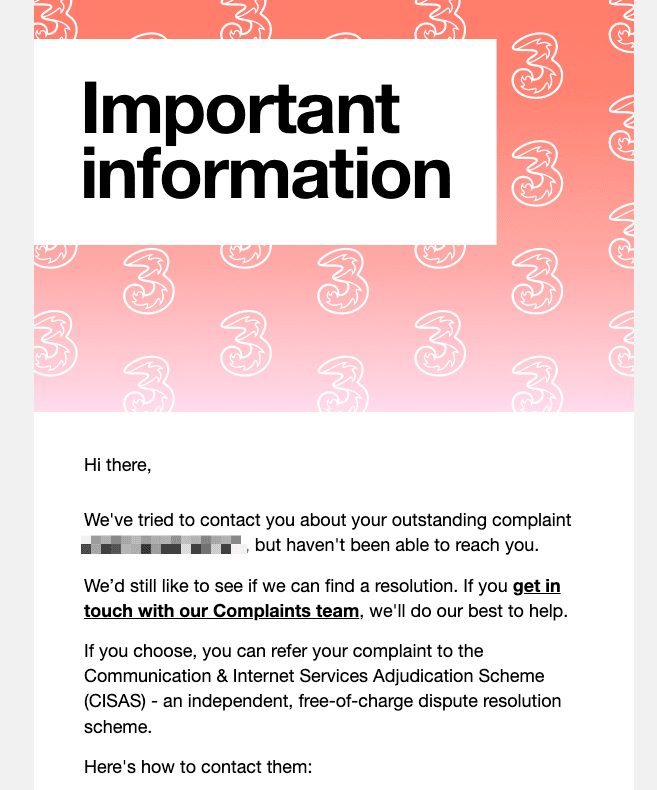
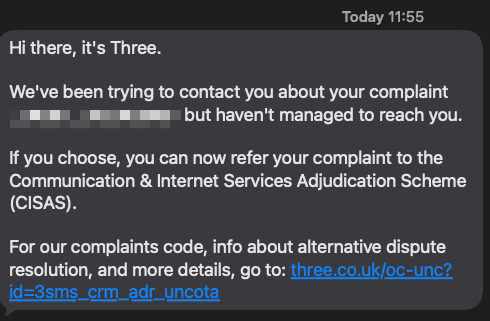
Today I received this email:
What particularly amuses me is that they also sent me a text to my EE phone number…
So clearly Three can contact me – email and phone seem to be fine. Now, I’ve had to put my phone into call screening mode as I’ve been getting a lot of spam and scam calls of late (those in my contacts should be able to bypass this – unless its an upcoming iOS 27 feature – I can’t remember right now).
If Three operates an auto-dial system, call screening could potentially cause it problems, but tough shit – this is 2026 and the state of spam and scam calls through phones is at all time high. I’ve had so many phone calls from a wide range of unrecognisable numbers that haven’t left voicemails over the past few weeks that I’ve simply blocked them. If it’s important – you should have left a message.
Companies need to work harder to improve communications around stuff like this. For example, the email could have said: “We tried to call you from this number: XXX XXXX XXXX”, as I could have checked my blocklist and even whitelisted the number through my contacts – but, alas, no). But. don’t tell me that you tried to contact me when you can clearly send texts and emails without a problem.
Meanwhile O2 still haven’t fixed the “too many redirects” loop bug that prevents me from doing anything useful in my account on the web. It eventually leads to a system error. I have raised a complaint/ticket with O2 and tried to email their webmaster, but to no avail. It’s an issue that cropped up after Telefonica and Virgin Media joined forces and united their authentication systems into one. It’s a complete bloody shambles.
Why are telecoms companies unable to design a web site that serves its customers well through a web site that offers performance, stability and security? What we get with the major operators is a massive pile of shit that is unfit for purpose and probably combines 20 years of inherited code that hasn’t changed very much in that time leading to all manner of problems. Three, Vodafone and O2 should all be ashamed. EE is the only company that has improved not just its web site, but its contact options so that you don’t go through a maze to get to the right people. It isn’t perfect, but it’s a damn sight better than the others.
I watched the latest Apple WWDC keynote presentation today and found it to be as exciting as mud. It’s effectively fixing and optimising everything from last year, and providing the kind of features they were promoting last year and failed to deliver.
What I found particularly grating was the revamped Image Playground which allows you to take a person from your photo library and use generative AI to put them into something or have them do something. This is somewhat worrying. Regardless of privacy of the AI model – e.g. whether it runs locally on device or in the “private” compute space, the problem is that this could potentially be abused. That said, it’s not as if people can’t already do this with the likes of Gemini’s Nano Banana Pro or Nano Banana 2. Apple just makes it easier.
Speaking of which, Siri with Apple Intelligence will let users reframe photos and allow generative AI to fill in stuff that doesn’t exist because of the framing. Talk about Orwellian nightmares! Everybody will soon be part of the ministry of misinformation! It’s all fun and games until it isn’t.
Another thing I’ve noticed at work – there appears to be increased presence from something called “Applebot” which, I assume, is linked to Apple Intelligence/Siri. This bot (which legitimately comes from Apple IP addresses) was hitting a site I was working on pretty hard (but not as hard as some others) which is somewhat worrying. Can we all expect these AI bots to start consuming web site bandwidth and CPU/memory as it crawls, digs and extracts information from websites?
Also, with all this Apple Intelligence baked into the phone and macOS, I find it strange that they haven’t mentioned about any possible improvements to call features such as call screening or scam detection. Are there any improvements? Even just having call screening as a toggle switch in the Control Centre for iOS would be a big improvement for me.
Everybody sing: Old McDonald had a server farm, A.I., A.I., OH NO?
Google, while I appreciate the efforts you’re going to make A.I. genuinely useful in Google Workspace, I’d really like you to revisit a few basic options that have gone untouched for decades. I’m talking about font selection and font sizes. At the moment, this is all you get:
In this case, I’ve chosen the larger size rather than normal. Normal, to me, is far too small when composing and sending messages. And what’s worse, you can’t specifically set a size for reading emails that have been sent in plain text. What are small, normal, large and larger sizes? Who knows – they are not allocated a number size – unlike the majority of font size options in.. oh, let me see, pretty much every other bloody product. Including Google Docs.
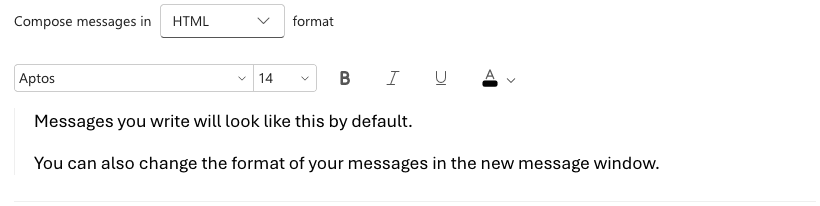
Whereas this is what I see in Outlook and Outlook for Web, I get a much better range of options:
Aptos 14 in Outlook is a good size. Larger Sans Serif in Gmail is larger than Aptos 14, though it is close. But it’s not close enough and annoys the heck out of me. As somebody who started their email journey on quite literally text terminals where there no such things as fonts or font sizes (as such). Everything was consistent.
Gmail has unfortunately been one of the few services that hasn’t really kept up with the basics – instead choosing AI over all else, and appears to be slipping behind even good old Pine which was a very capable email client back in the day. I just don’t get as much joy as writing emails with Gmail as I do with Outlook or any other client.
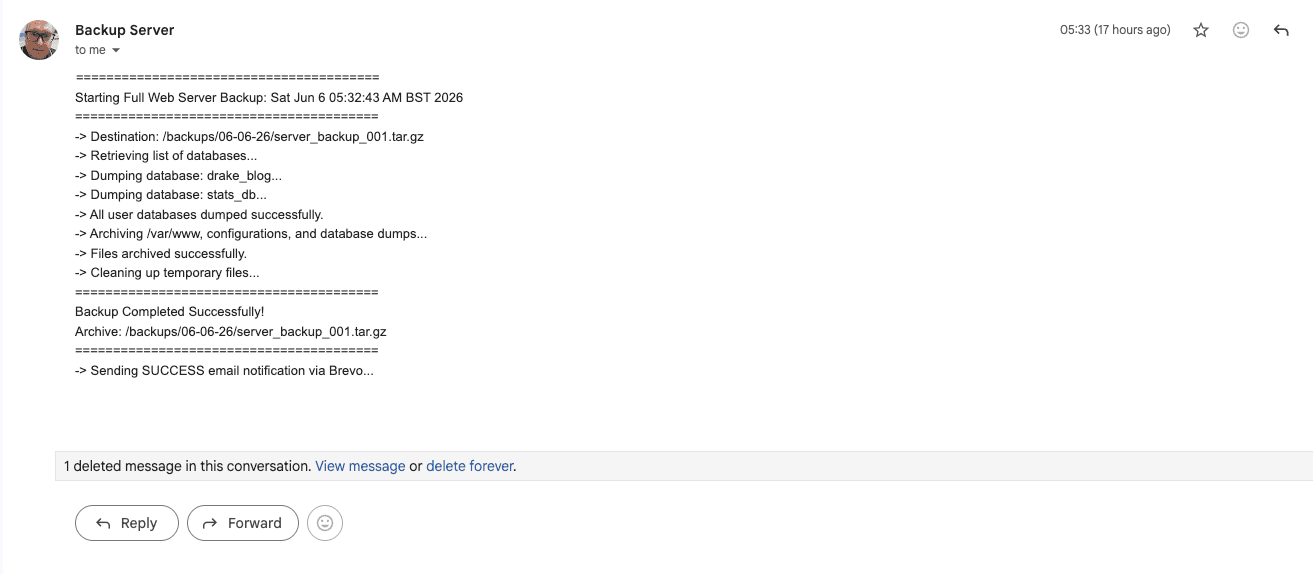
Reading email when the sender uses Gmail’s default small font or plain text is also a terrible experience. Take this email from my server to let me know local backups have completed. The font is too small. Gmail offers me no official method of setting a default size for reading email.
I’ve tried to create a Chrome extension using Claude that will override Google’s default fonts and font sizes, but while it works in principal, it’s an uphill struggle with potential compatibility issues and future updates from Google.
There is also a third-party Chrome extension that I’ve used in the past called V7 Gmail Zoom – and it works wonderfully well. You can set default text sizes for both reading and composing. But because Gmail ends out such tiny text by default, and having now gone “large” to make thing easier – email I send myself looks too big.
Sigh. This shouldn’t be a thing in 2026. Come on, Google, fix this stuff.
Thanks, YouTubers, for releasing entire gameplay walkthroughs before the official release date. Though I should really be saying: bad YouTubers, bad. To your beds. Naughty YouTubers.
But at least this confirms that myself and others that have now left the company have been given credits for this game which was in development for as long as I was at SMG. One day I shall look forward to playing it myself.
I am somewhat amused with my own IMDb entry in that the “Known For” section shows three video games and one video game film adaptation.
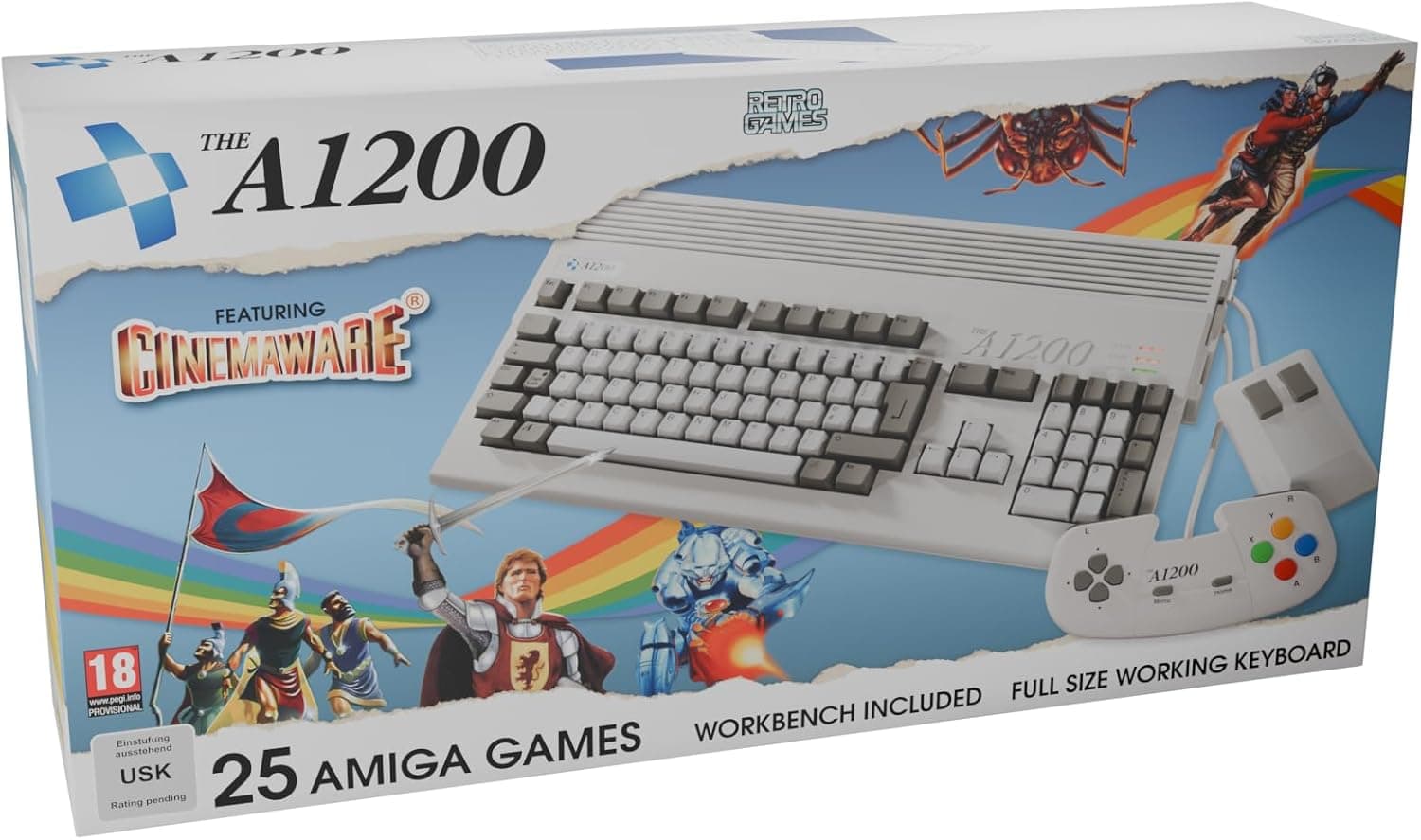
Having grown up mainly around the ZX Spectrum (the ZX81, the 48K, 48K+ and the +2A), it makes me happy to see companies releasing authorised modern equivalents of these 8-bit masterpieces (we have the Commodore 64 Ultimate and 64C Ultimate, the Amgia A1200, and the ZX Spectrum Next).
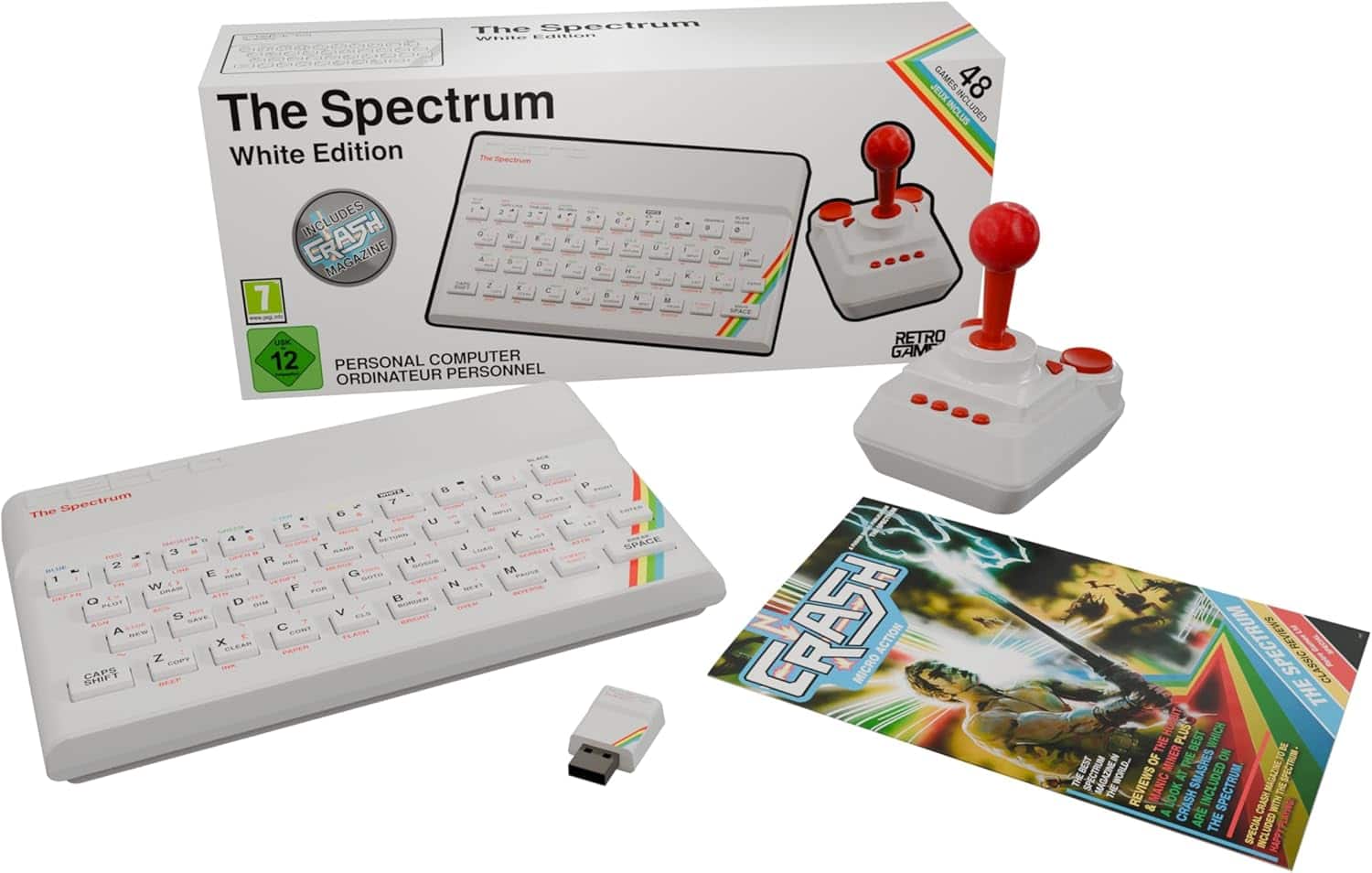
I must admit I like the idea of this white ZX Spectrum based on the rubber key variety. It’s been fully updated with HDMI and modern inputs including USB-A ports. £129. I’d also like to own the Amiga A1200 (£169) as there was no possible way of owning one back when I was a kid – it was far too expensive (as was the BBC Micro which had the best keyboard of any of the 8-bit computers).
However, even if I had the budget for them, I don’t have the space as it is. I’ve also feel that I’ve moved on quite a bit from the 8-bit retro gaming scene (though I occasionally yearn for a quick go at Chuckie Egg). Things got really interesting when I moved up to an Amstrad PC3086. It didn’t have a hard drive, but it did have two types of floppy drive and you could easily play decent games thanks to its VGA graphics (which was fancy at the time – especially at that price point) even if you had to keep swapping disks out every so often.
Ah, the memories.. but it was a right bugger to type on
But it’s great that there are companies out there that cater to those who are nostalgic for the good old days of gaming and programming. It makes us appreciate what we had before all the nonsense that we have now (Windows 11, I’m looking at you).
The Atari ST or the Amiga A1200 was THE ultimate gaming machine back in my day